
bbr marketing Blog
Related Articles
A New Look for LinkedIn Profile Pages
By bbr
by Sarah Warlick, copywriter and editor
As LinkedIn grows in popularity it’s seeing more daily use by its members. In response, the professional networking platform has just revealed a new look for profile pages. The updated look is intended to allow more expressive options for sharing your background and experience, better access to information about your contacts and other users and increase engagement with the people in your network.
They’ll be switching members’ pages to the latest style over the next few weeks. For those who can’t wait, here’s a link to request the new profile right away https://www.linkedin.com/profile/sample. In the meantime, the more patient can take a look at what’s in store.
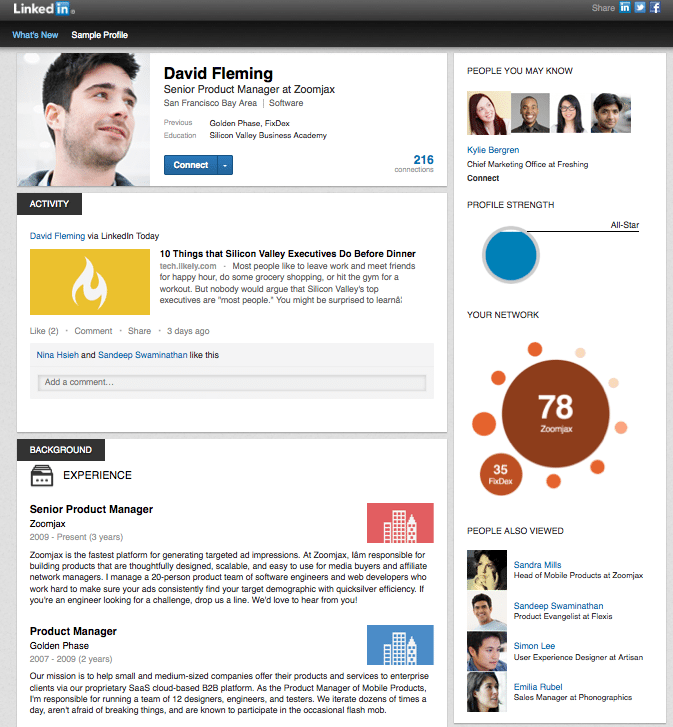
The top of the page shows a brief introduction, with a profile picture beside the page owner’s name, current position and location. This intro box includes room for the names of previous companies and an educational institution, as well as a mention of the number of contacts you have. It also hosts the ‘Connect’ button to extend an invitation for contact. Below is the user’s most recent site activity. When you post an update or article this is where it shows up, along with any comments your contribution generated.
Following this section is a space for extended professional background with company names, dates and a description of your role in each position. Your detailed educational history and list of professional skills also appears in this area. At the bottom of the profile is a section with profile pictures of your many contacts. A sidebar on the right gives you suggestions for people LinkedIn thinks you may know and a kind of groovy graphic that illustrates the distribution of your contacts by company. At the bottom of this sidebar is a list of others whose profiles were viewed along with yours.
That’s the new layout at a glance. Whether it actually increases engagement and access to information remains to be seen. The network wants the redesigned page to give you “a better way to connect and build relationships.” Their goals for improvement using the new profile include:
Presenting yourself and your skills. New profile editing capabilities join the graphic changes to let you update your profile and make it tell your story effectively.
Viewing information. One of the biggest changes is the way you can now see visual representations of your contacts, other users and their companies. The idea is to let you see patterns amongst the people you know and find others that help you professionally.
Interacting with other users. By moving the activity stream up near the top of the page, you can keep up with conversations and updates as they happen.
For more about the new profile you can watch the official LinkedIn video discussion about the update. And if you’re one of the early adopters, either by choice or because your page received an early update from the network, let us know what you think of it. Does it change your impression of the site or its usefulness? Are you using it to network differently? We’d love your feedback.