
bbr marketing Blog
Related Articles
What does Google Analytics measure?
By Bonnie Buol Ruszczyk
by Kelly Googe Lucas, marketing and social media manager
Google Analytics provides powerful information that you can use to increase traffic to your site.
At some point during a marketing strategy meeting, someone has referred to your website bounce rate. You just go along with whatever he or she is saying because in reality, you have no idea what a bounce rate is. You know it’s measured on your Google Analytics, but you don’t know what half that stuff is anyway. We’re here to help you get a basic grasp of what your Google Analytics report is trying to tell you.
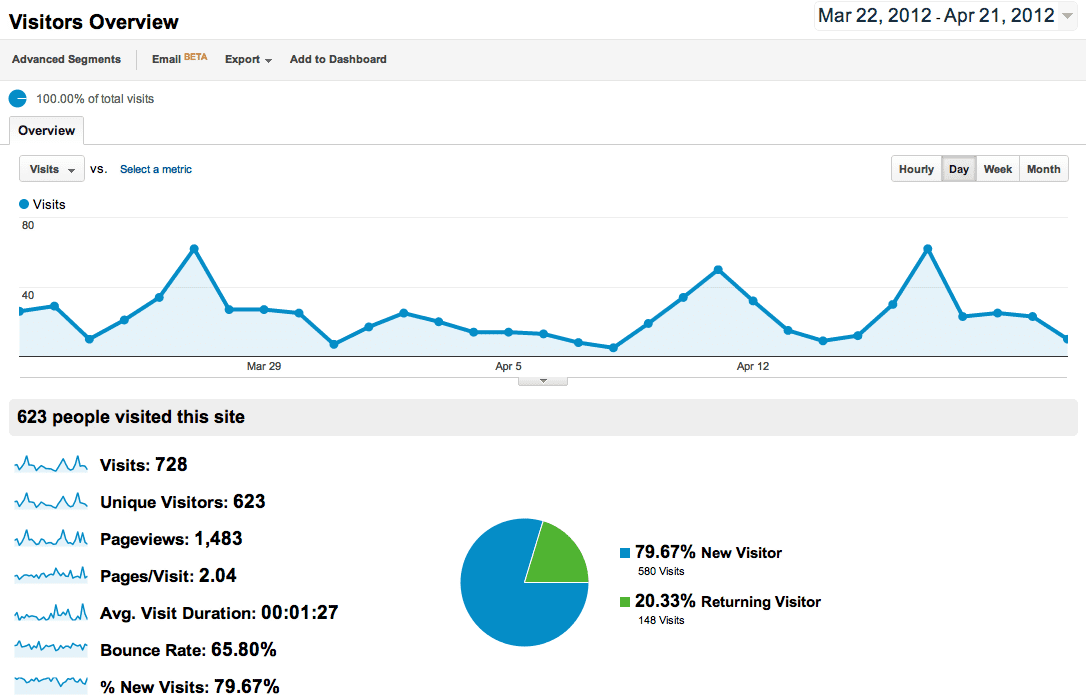 Bounce Rate: This is a measure of how quickly someone leaves your site, or how long it takes them to “bounce” off your site. The bounce is measured as a percentage of people who stay on the site about 10 seconds or longer. If your bounce rate is around 40-50 percent, this is average. “If your bounce rate is around 80% or higher, you’re doing something wrong,” says Chris Zimmerman, president of Zimrock Marketing. “People don’t like it when it takes too long to find the info they need on a site. If they can’t find it within a few seconds, they bounce and go somewhere else.” This reinforces the importance of easy navigation and the importance of making a good impression immediately so that your visitors stay on your site rather than jumping to another.
Visits and Visitors: These rates are measured in a variety of ways including new vs. returning, how many pages per visit and visit duration. For an average website, you want your ratio of new visitors to return visitors to be at least two to one. Return visitors aren’t a bad thing; the more they come back the more likely they are to reach out to you. But if you’re trying to grow and increase business, you want more new visitors checking you out.
When visitors are on your site, how many pages are they visiting? On average, a browsing visitor will click through two to three pages to get an understanding of the company. Is your website organized in a way that allows visitors to get their needed information quickly and in a user-friendly manner? Also look at how long they spend on your site. Ideally, you want to see averages of at least two minutes. Believe it or not, this is a long time in the world of websites. It typically means they are staying long enough to learn who you are and what you do.
Traffic Sources: This is exactly what it sounds like, a list of sources sending traffic to your website. In your traffic overview, one of the sources is “Direct.” This means that someone manually typed in your web address that was found on a mailer, brochure, business card, etc. “Referral” traffic is when your site is linked from another location like other websites, email signatures, etc. “Search” traffic is when your site was clicked after coming up in an Internet search. While all traffic to your site is good, having a higher search traffic percentage is best as it illustrates you are making it easy for people to find you. Pay attention to the keywords section of the page. These are the terms people are typing into the search engine that lead them to your site. You can use this knowledge to better customize your messaging and tweak your content.
There is so much more to Google Analytics than just these features. All the numbers have meaning and can help you hone your marketing. I encourage you to take some time and pull up your analytics to review your rates and figures. If you find your numbers aren’t where you want them to be, look at your site and see where you can make some adjustments to create a better experience for your visitors. If you find you just don’t have the time or patience for this sort of thing, that’s why we’re here.
How often do you view your website’s analytics? Do you have questions about what your analytics mean? We’d love to hear from you.
I think it’s also important to take the bounce rate as a very general indicator because it may swing wildly depending on the type of website. For service industries, the bounce rate could be affected by visitors coming simply to look for a phone or fax number. Meaning they visit the homepage, grab the number and leave, creating a “bounce.” This is much different than a website which focuses on direct response or some type of e-commerce, where the site’s chief goal is to perform some type of action, like signing up or buying something.
Great article! Easy to understand. Will be sharing with other employees so they finally understand what Google Analytics measures. Thanks!
This really answered my problem, thank you!